Summary: in this tutorial, you will learn about SQL subquery that is a regular query nested inside another query to form a complex query.
Introduction to SQL subquery
A subquery is a regular SELECTstatement nested inside another query such as SELECT, UPDATE or DELETE statement. The following picture illustrates the subquery concept:
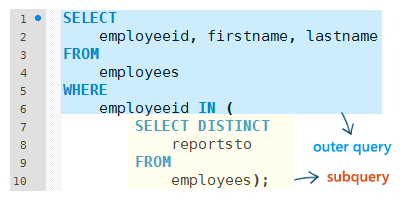
A subquery is also known as inner select or inner query, while the query that contains the subquery is called outer select or outer query.
In the picture above, the subquery returns a result set that consists of three rows.
SELECT DISTINCT
reportsto
FROM
employeesCode language: SQL (Structured Query Language) (sql)
This result set is fetched to the IN operator of the outer query. The query can be translated as:
SELECT
    employeeid, firstname, lastname
FROM
    employees
WHERE
    employeeid IN (5 , 3, null);Code language: SQL (Structured Query Language) (sql)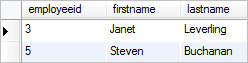
It returns all the managers in the employeestable.
In this example, the result of the subquery is used by the outer query. The database engines executes the whole query twice, once for the subquery and once for the outer query.
A subquery can be also nested inside another subquery. The the number of nesting levels depends on the implementation of a specific database product. For example, Microsoft SQL Server supports up to 32 levels.
SQL subquery examples
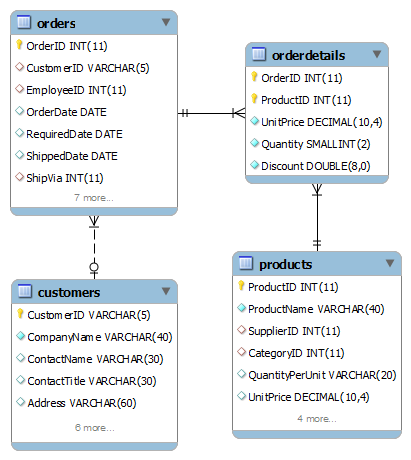
In the following examples, we are going to use the following tables in the sample database:
- customers – stores customer master data.
- products – stores products master data.
- orders – stores order header data including customer who made the purchases.
- orderdetails – stores order line items data.
A subquery can return one or more rows. When the subquery returns a single row, you can use the comparison operator such as =, >, < , >=, <= and <> in the outer query to compare value with the value returned by the subquery.
For example, the following query selects all customers who locate the same city as the customer id BSBEVby using the not equal (<>) operator:
SELECT
    customerid, companyname, city
FROM
    customers
WHERE
    customerid <> 'BSBEV'
        AND city = (SELECT
            city
        FROM
            customers
        WHERE
            customerid = 'BSBEV')Code language: SQL (Structured Query Language) (sql)
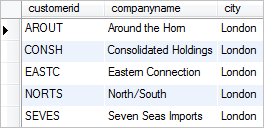
First, the subquery returns city where customer BSBEVlocates, which is London. Then the London city is used to supply to the outer query to find all customers who locates in the London city.
SQL subquery with IN and NOT IN operators examples
In case the subquery returns a result set that contains multiple rows, you can use the IN or NOT IN operator in the outer query to check if value is in the set of values returned by the subquery.
For example, the following query selects all orders of customers in the USA. The subquery selects all customer IDs in the USA, and this set of IDs is used in the outer query to select orders:
SELECT
    orderid, customerid, shipname
FROM
    orders
WHERE
    customerid IN (
        SELECT
            customerid
        FROM
            customers
        WHERE
            country = 'USA');Code language: SQL (Structured Query Language) (sql)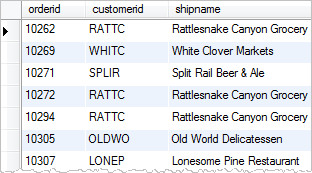
You can also use the NOT IN operator to query all orders that are outside of the USA as the following query:
SELECT
    orderid, customerid, shipname
FROM
    orders
WHERE
    customerid NOT IN (
        SELECT
            customerid
        FROM
            customerS
        WHERE
            country = 'USA')Code language: SQL (Structured Query Language) (sql)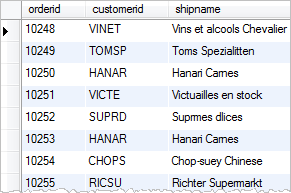
SQL subquery with the UPDATE statement example
A subquery can be nested inside other statements such as UPDATE and DELETE statements rather than the SELECT statement.
For example, the following statement increases unit price of products supplied by the vendor 15 by 5%:
UPDATE products
SET
    unitprice = unitprice * 1.05
WHERE
    productid IN (
        SELECT
            productid
        FROM
            suppliers
        WHERE
            supplierid = 15);Code language: SQL (Structured Query Language) (sql)
The subquery selects all IDs of products supplied by the vendor 15. The set of IDs is then fetched to the UDPATEstatement to update the unit price.
SQL subquery as an expression example
A subquery can be used to substitute an expression in SQL statements. For example, the following query returns the prices of all beverage products, the product’s average price, and the difference between the unit price and the average price.
SELECT
    productid,
    productname,
    (SELECT
            AVG(unitprice)
     FROM
            products) AS 'average price',
          (unitprice - (
              SELECT
                   AVG(unitprice)
              FROM
                   products)) AS diff
FROM
    products
WHERE
    categoryid = 1Code language: SQL (Structured Query Language) (sql)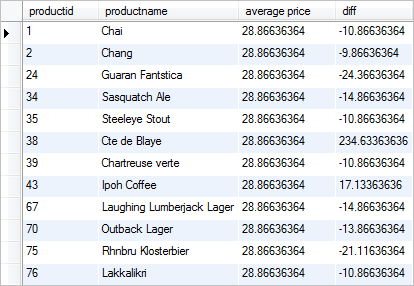
SQL subquery with EXISTS and NOT EXISTS operators
A subquery can be used to test existence of rows when combining with the EXISTS and NOT EXISTS operator. Check it out the SQL EXISTS operator tutorial to learn how to use EXISTS opeartor with subqueries.
SQL correlated subquery
The subquery that we have seen so far can execute independently. There is another kind of subquery which cannot be executed independly called corralted subquery. We will cover the correlated subquery in the next tutorial.
In this tutorial, we have introduced you to the SQL subquery and shown you how to write queries that contain subqueries.

